


This object is in archive!

Unnecessary values in virtual meter.
Need Answer
How to i can get rid of these unused values from virtual meter? All of them are marked "hidden".
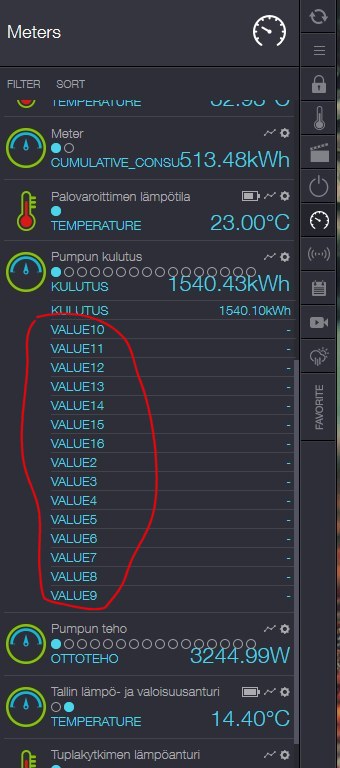
 The same question
 You can't vote. Please authorize!
No connection
Real-time notifications may not work
Any ideas?
Any ideas?
I have the same issue.
However it is only visible in the new GUI. In the old GUI all looks OK.
I have the same issue.
However it is only visible in the new GUI. In the old GUI all looks OK.
go into the device manager and set them to "hide in device browser"
go into the device manager and set them to "hide in device browser"
I read his first post, but all it says is: All of them are marked hidden. As there are several locations where you can mark them hidden, I assumed he did it in the device browser, and not the device manager.
device browser:
so in the device browser "hide device" is not checked, as that didn't work. But checking it in the device manager works for me.
I read his first post, but all it says is: All of them are marked hidden. As there are several locations where you can mark them hidden, I assumed he did it in the device browser, and not the device manager.
device browser:
so in the device browser "hide device" is not checked, as that didn't work. But checking it in the device manager works for me.
I believe clicking once on the icon works also
I believe clicking once on the icon works also
There is lot more places, where these values are also visible unnecessary. Even they are marked hidden in device manager.
There is lot more places, where these values are also visible unnecessary. Even they are marked hidden in device manager.
I checked again and tried hiding the unnecessary values any way possible. Without success.
I checked again and tried hiding the unnecessary values any way possible. Without success.
The point is, that these values ghosting everywhere without any need. Why they appear by deault without option to delete?
The point is, that these values ghosting everywhere without any need. Why they appear by deault without option to delete?
I have created a new virtual device, in the new GUI. My new device has only two values visible as that is what I need.
I then went on to the old GUI and made a change to the same to values. And all of a sudden the blank values are there.
This doesn't really solve anything. But it may be something the Zipato team can look into.
I have created a new virtual device, in the new GUI. My new device has only two values visible as that is what I need.
I then went on to the old GUI and made a change to the same to values. And all of a sudden the blank values are there.
This doesn't really solve anything. But it may be something the Zipato team can look into.
Replies have been locked on this page!