


This object is in archive!

Why does my simple rule not work?
Answered
I'm only just starting to work with the rule creator, but it already gives me a headache. I want to create a rule to set my dimmer to a certain level in a specified timeframe, but it just doesn't work...
Yes, I did save the rule and I did synchronize with the box.
Anyone can help? It must be dead simple...
Thanks in advance!
Files:
capture(1).png
 The same question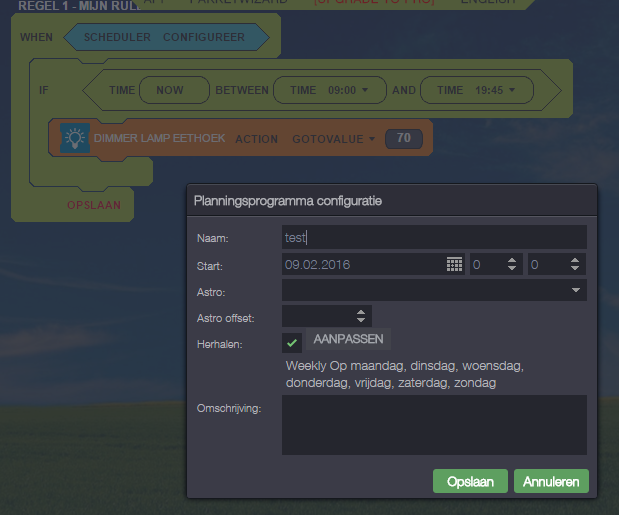
You can't vote. Please authorize!
No connection
Real-time notifications may not work
Hi
your rule says:
1 - At 0:00 (midnight)
2 - if it is between 9:00 and 19:45
3 - then put the light at 70
well... midnight is not between 9:00 and 19:45 so it will never work.
Not sure what you want achieve but perhaps this:
RULE 1:
1- When "switch that controls the dimmer" is "ON" (action)
2 - IF "NOW is betweeen 9:00 and 19:45"
3 - then put the dimmer at 70
RULE 2:
1 - WHEN "Scheduler to run at 9:00" at every day
2 - IF "switch is ON"
3 - then put the dimmer at 70
I think those two rules together will do what you want
FP
Hi
your rule says:
1 - At 0:00 (midnight)
2 - if it is between 9:00 and 19:45
3 - then put the light at 70
well... midnight is not between 9:00 and 19:45 so it will never work.
Not sure what you want achieve but perhaps this:
RULE 1:
1- When "switch that controls the dimmer" is "ON" (action)
2 - IF "NOW is betweeen 9:00 and 19:45"
3 - then put the dimmer at 70
RULE 2:
1 - WHEN "Scheduler to run at 9:00" at every day
2 - IF "switch is ON"
3 - then put the dimmer at 70
I think those two rules together will do what you want
FP
Thanks FP! I think I could work with your second solution.
I just don´t have the switch that controls the dimmer (a Fibaro dimmer of which the level is controlled by a pulse switch...
HH
Thanks FP! I think I could work with your second solution.
I just don´t have the switch that controls the dimmer (a Fibaro dimmer of which the level is controlled by a pulse switch...
HH
OMG! Sounds like even more difficulties...
OMG! Sounds like even more difficulties...
OK, I tried to add a virtual switch (see attachment) and changed my rule (see attachment).
Still not working... Any more suggestions??
OK, I tried to add a virtual switch (see attachment) and changed my rule (see attachment).
Still not working... Any more suggestions??
Start slowly. I'm seing you are new on this things :)
(I'm supposinge ANN = ANY)
do it like this.
1 > change the "ANY" on the virtual switch the "ON"
2 > remove the IF and put just the scene,
3 > save and sync
This way you'll get:
- when you do "ON" on virtual switch the scene will run. Try that
If it does work than the problem is on the scheduler. try with different values (ex: from 00:00 to 23:50) etc
FP
Start slowly. I'm seing you are new on this things :)
(I'm supposinge ANN = ANY)
do it like this.
1 > change the "ANY" on the virtual switch the "ON"
2 > remove the IF and put just the scene,
3 > save and sync
This way you'll get:
- when you do "ON" on virtual switch the scene will run. Try that
If it does work than the problem is on the scheduler. try with different values (ex: from 00:00 to 23:50) etc
FP
Thanks Filipe! Now at least I know the switch works and I can try to extend my rule(s).
Where do I find you when I need help again? :)
HH
Thanks Filipe! Now at least I know the switch works and I can try to extend my rule(s).
Where do I find you when I need help again? :)
HH
Replies have been locked on this page!