


How to play a sound from the local network on Sonos
Under Consideration
Some have said that it's impossible to play a sound on the Sonos from the local network. Not true - you just need to use the correct (obscure) syntax.
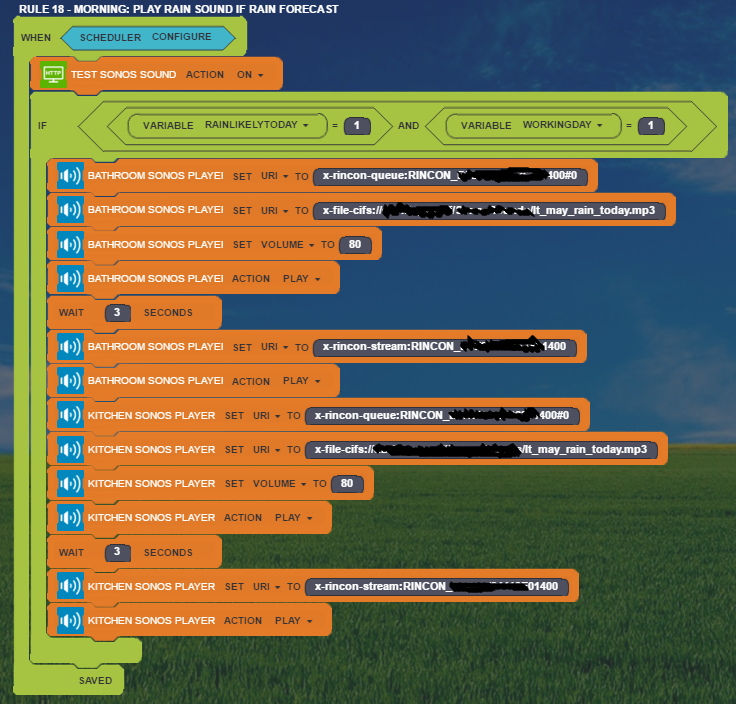
The prefix needs to be x-file-cifs:, and the slashes should be forward slashes, Unix-style. The rest is just the name of the computer, shared folder, and file name, e.g.:
x-file-cifs://mycomputer/SharedSounds/raintoday.mp3
However before that I think you need to set the URI to x-rincon-queue: and send the RINCON of the player itself (the one from which you want the sound to play). I'm pretty sure that it doesn't work unless you do this first step.
Files:
Rule 18 - Morni...
 I like this idea
Access denied
No connection
Real-time notifications may not work
Hello David,
I have a Android set-top box for TV. I installed a little webserver on that box. An external SD card is my data provider. I have access with:
http://192.168.x.x:port/sound.mp3
first as allways the IP adress of the webserver
port is the choosen port (i.e. 8080)
and the file you want to play.
works
Hello David,
I have a Android set-top box for TV. I installed a little webserver on that box. An external SD card is my data provider. I have access with:
http://192.168.x.x:port/sound.mp3
first as allways the IP adress of the webserver
port is the choosen port (i.e. 8080)
and the file you want to play.
works
Through the Sonos? Nice.
That's another option.
Through the Sonos? Nice.
That's another option.
Yes. I recorded some voice mail for intruders :-) and put them on this webserver. Now I have rule which activates this sound by motion at night...
Yes. I recorded some voice mail for intruders :-) and put them on this webserver. Now I have rule which activates this sound by motion at night...
Nice, thanks for sharing.
Nice, thanks for sharing.
Does anybody know if/how I can have the following URL send to the SONOS? Or must it be converted first?
http://translate.google.com/translate_tts?ie=UTF-8&total=1&idx=0&textlen=32&client=tw-ob&q=Hi%20this%20is%20a%20test&tl=En-gb
Does anybody know if/how I can have the following URL send to the SONOS? Or must it be converted first?
http://translate.google.com/translate_tts?ie=UTF-8&total=1&idx=0&textlen=32&client=tw-ob&q=Hi%20this%20is%20a%20test&tl=En-gb
Replies have been locked on this page!