


This object is in archive!

Qubino Flush Dimmer
Need Answer
http://qubino.com/products/flush-dimmer/I read on this homepage that Qubino have double tap function to go to 100% but it does not look like I have this. Is it possible to fix this in some way?
Parameter 21 or something?
If the dimmer needs a firmware update how do I fix that?
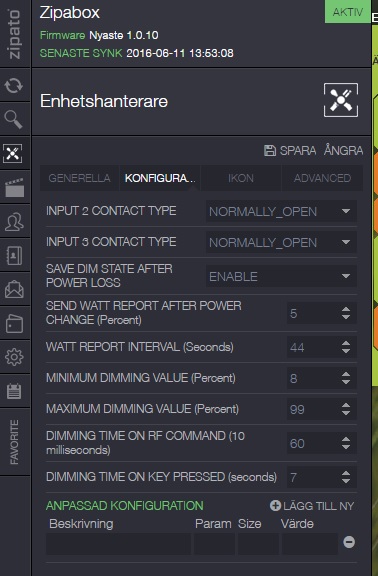
Best regards Jacob
 The same question
 You can't vote. Please authorize!
No connection
Real-time notifications may not work
You could check if that parameter is available in the manual that came with the dimmer.
I was fighting with similar problems with Qubino dimmers, and found out that my dimmers had so old firmware that all the useful features were missing. I couldn't figure out any way to update the dimmer's firmware.
You could check if that parameter is available in the manual that came with the dimmer.
I was fighting with similar problems with Qubino dimmers, and found out that my dimmers had so old firmware that all the useful features were missing. I couldn't figure out any way to update the dimmer's firmware.
Dear Jacob,
as I can see from manual you can enable double click function.
Parameter no. 21 - Enable/Disable | Double click function
If Double click function is enabled, a fast double click on the
push button will set dimming power at maximum dimming value.
Available configuration parameters (data type is 1 Byte DEC):
-default value 0
-0 - double click disabled
-1 - double click enabled
Dear Jacob,
as I can see from manual you can enable double click function.
Parameter no. 21 - Enable/Disable | Double click function
If Double click function is enabled, a fast double click on the
push button will set dimming power at maximum dimming value.
Available configuration parameters (data type is 1 Byte DEC):
-default value 0
-0 - double click disabled
-1 - double click enabled
Like this?
Like this?
Failed? Cant retrive from paramerter 21 size 1?
Failed? Cant retrive from paramerter 21 size 1?
You could check if that parameter is available in the manual that came with the dimmer.
I was fighting with similar problems with Qubino dimmers, and found out that my dimmers had so old firmware that all the useful features were missing. I couldn't figure out any way to update the dimmer's firmware.
You could check if that parameter is available in the manual that came with the dimmer.
I was fighting with similar problems with Qubino dimmers, and found out that my dimmers had so old firmware that all the useful features were missing. I couldn't figure out any way to update the dimmer's firmware.
Or if it is possible to buy a dongle that makes it possible to update any zwave device?
Or if it is possible to buy a dongle that makes it possible to update any zwave device?
Try without the size (leave it empty).
Try without the size (leave it empty).
I think you have ZMNHDA2, this don't have this parameter.
On ZMNHDD1 (With Z-Wave Plus) have this parameter.
Erik
I think you have ZMNHDA2, this don't have this parameter.
On ZMNHDD1 (With Z-Wave Plus) have this parameter.
Erik
You need to send it to qubino for replacement. Get in touch with them and tell the problem. They should help.
You need to send it to qubino for replacement. Get in touch with them and tell the problem. They should help.
Replies have been locked on this page!